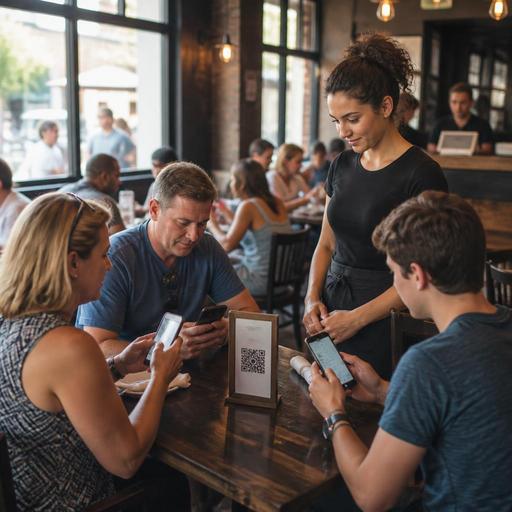
How Multilingual QR Menus Help U.S. Restaurants Serve Tourist Areas
Multilingual QR menus can help U.S. restaurants serve guests more clearly in tourist districts and diverse neighborhoods, especially when staff members are juggling dine-in checks, takeout, curbside pickup, and delivery app orders at the same time. For operators in places like Miami Beach, Anaheim, Las Vegas, Manhattan, San Antonio, Honolulu, and neighborhood corridors with strong immigrant communities, the goal is not just translation. It is smoother ordering, fewer mistakes, faster table turns, and a better guest experience without forcing servers to act as full-time interpreters.
Why multilingual QR menus matter in U.S. service environments
In many American restaurant settings, language friction shows up in small but expensive ways. A guest scans the menu but cannot tell whether a dish is spicy, whether fries are included, or whether a combo comes with a fountain drink. A server spends extra minutes explaining modifiers while other tables wait to close out their tabs. A family in a tourist area hesitates to order cocktails because they do not understand house ingredients or size differences. These moments can slow service and increase voids, remakes, and guest dissatisfaction.
A multilingual QR menu helps operators present the same core menu in different languages while keeping pricing, item availability, and modifier structure consistent. In a Southern California taco shop near theme-park traffic, for example, an English menu may be enough for locals, but translated views in Spanish, simplified Chinese, or Korean can reduce ordering hesitation for visitors and nearby residents. In a Queens cafe serving a mixed neighborhood, a QR menu can support English plus commonly spoken local languages while still routing every order into one POS and kitchen display workflow.
For U.S. operators, the biggest win is operational consistency. Instead of printing separate paper menus that go out of date, staff can update one digital source when an item sells out, a happy hour changes, or a seasonal dessert ends. That matters in fast-casual, food truck, hotel restaurant, and multi-location environments where speed and accuracy directly affect labor efficiency.
What to translate and what to keep operationally standardized
Not every part of the menu should be handled the same way. Smart operators separate guest-facing language from kitchen-facing production language. Guests need clear explanations. The kitchen needs standardized item names, modifiers, and firing instructions.
For example, a seafood spot on the San Diego waterfront might display a guest-facing translation for grilled fish tacos, but behind the scenes the POS and kitchen display system should still use the same internal product structure, modifier buttons, and prep routing. That keeps expo, line cooks, and cashiers aligned even when the guest reads a different language version.
Focus translation effort on the parts that most affect ordering confidence:
- Item names and short descriptions
- Protein choices, sides, sauces, and spice levels
- Common allergen and ingredient notes where appropriate
- Beverage format details such as draft, bottle, frozen, or refillable fountain drink
- Ordering instructions for combos, family meals, and add-ons
- Pickup, curbside pickup, and direct online ordering steps
Keep operational elements standardized in your back-end setup:
- POS item names
- Kitchen display abbreviations
- Printer routing and station assignment
- Tax category mapping and reporting fields
- Modifier logic and required choices
If you serve alcohol, make sure translated content does not create confusion about what is included, how pours are described, or what house rules apply. Operators should verify current state and local alcohol, labeling, and service requirements with qualified advisors or official guidance.
Build for real U.S. guest journeys, not just translation
The best multilingual QR menu is designed around how guests actually order in the United States. A tourist in a downtown Chicago burger spot may want to scan, browse, and pay at the table. A family in Orlando may want to review the menu in one language and then place the order with a server. A food truck near the National Mall may need a scan-to-order flow that moves guests through the line quickly without creating a crowd around the pickup shelf.
Map your menu experience to your service model:
- Full-service restaurant: Use QR menus to explain dishes, upsell appetizers and desserts, and reduce back-and-forth on modifiers while servers still manage checks and tips.
- Fast-casual or QSR: Let guests scan, switch languages, order, and pay quickly, with clear pickup names and shelf instructions.
- Food truck: Keep the translated menu short, mobile-friendly, and easy to scan in bright outdoor light with quick item photos or concise descriptions.
- Hotel restaurant: Support travelers who may not be familiar with local menu terms, and connect dine-in, room service, and lobby pickup where relevant.
- Multi-location brand: Standardize translations centrally, but allow store-level item availability and neighborhood-specific menu sections.
Also think through payment expectations. In the U.S., guests may encounter tipping prompts, service charges, sales tax, or delivery fees depending on the ordering channel. Your digital menu and checkout flow should explain charges clearly and consistently. Operators should confirm how fees, gratuities, and taxes are displayed and reported based on their POS, payment processor, and local requirements, and review current rules with qualified tax or legal advisors when needed.
Accessibility, clarity, and staff workflow still come first
A multilingual QR menu should not create a worse experience for guests who prefer verbal service, need larger text, or use assistive technology. In practice, that means keeping a small number of printed backup menus available, training staff to offer help without making guests ask repeatedly, and choosing a mobile menu design with strong contrast, readable font sizes, and simple navigation.
ADA-minded access is especially important in U.S. operations. A QR code alone is not a hospitality strategy. A neighborhood diner in Boston or a stadium concession stand in Dallas still needs a clear alternative for guests who cannot or do not want to use their phones. Operators should review accessibility expectations for their specific business with qualified advisors and current official guidance, especially if they operate in high-traffic public venues or across multiple jurisdictions.
Staff training matters just as much as the software. Teach hosts, cashiers, servers, and bartenders how to guide guests through language switching, ordering, and payment in one or two sentences. For example: You can scan here, tap the language button, and order directly, or I can walk you through the menu and start your tab here. That script saves time and reduces awkward handoffs.
During busy shifts, make sure labor scheduling reflects the reality that multilingual menus reduce friction but do not eliminate guest questions. You may still need a strong greeter at the door, a cashier near the pickup shelf, or a floor lead who can step in when tourists are unfamiliar with U.S. tipping customs or direct online ordering flows.
A practical rollout plan for operators
If you want multilingual QR menus to improve operations instead of adding complexity, start small and measure the effect.
- Choose two or three languages first based on actual guest traffic, reservation notes, staff feedback, and neighborhood demand.
- Translate high-impact sections first such as best sellers, combos, drinks, kids meals, and common modifiers.
- Test on real phones in dining room lighting, sidewalk glare, and weak-signal conditions.
- Audit menu wording so translated descriptions match what the kitchen actually plates.
- Train the team on how to explain scanning, ordering, checkout, and pickup.
- Track operational results such as fewer order corrections, faster ordering at peak, and smoother service for out-of-town guests.
- Review multi-channel consistency across QR ordering, direct online ordering, delivery apps, and in-store POS menus.
A practical example: a fast-casual bowl concept in Los Angeles could launch English, Spanish, and Korean QR menus in one location near heavy tourist and neighborhood foot traffic. The operator can monitor whether guests complete orders faster, whether staff spend less time explaining proteins and sauces, and whether average check improves when add-ons are easier to understand. A New Orleans bar and grill in a tourist corridor might use multilingual QR menus mainly for food descriptions and tab-starting convenience, while keeping bartender-led service for alcohol orders.
Done well, multilingual QR menus are not just a translation project. They are a service design tool that can improve clarity, throughput, and guest comfort across diverse U.S. restaurant environments. Restomas helps operators manage digital menus, QR ordering, and connected workflows in a way that is easier to update as menus, neighborhoods, and service models evolve.