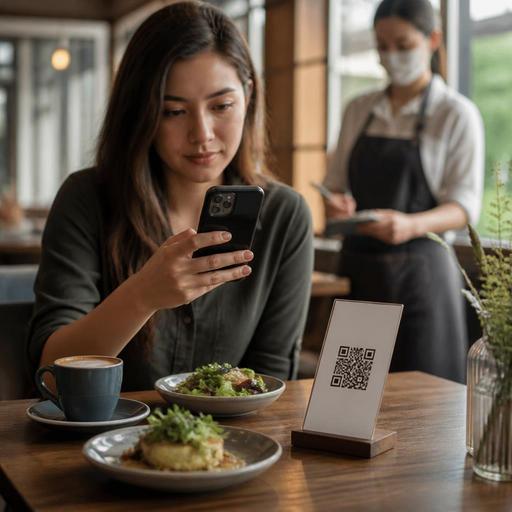
How Menu Category Order Shapes QR Menu Scanning and Guest Choices
Why menu category order matters more than most operators think
Menu category order has a direct effect on how guests scan a digital menu, what they notice first, and how quickly they decide. In a printed menu, layout, paper size, and design cues shape attention. In a QR menu, the sequence of categories often does even more work. Guests usually arrive on a small screen, often while talking to friends, waiting for service, or deciding in a hurry. That means the first few categories carry extra weight.
Many restaurants organize categories from an internal point of view: kitchen stations, POS setup, supplier groups, or the order in which the menu was originally created. Guests do not think that way. They scan with a goal. One guest wants a quick lunch. Another wants coffee and dessert. A family wants to find children’s options fast. A tourist may look for signature local dishes first. If the category order makes those paths easy, the menu feels clear. If not, the menu feels longer and more confusing than it really is.
This is why category order should be treated as an operational decision, not only a design choice. A smart sequence can reduce hesitation, shorten table-side explanations, support upselling naturally, and guide guests toward items you most want to sell. A weak sequence can bury profitable dishes, create repeated staff questions, and slow the ordering flow.
What guest scanning behavior usually looks like on a QR menu
When people open a QR menu, they rarely read from top to bottom with patience. They skim. They jump. They compare. On mobile screens, this behavior becomes even more selective. Guests often make a quick judgment within seconds: “Is this menu easy?” If the answer is yes, they continue. If the answer is no, they either ask staff for help or default to familiar items.
In practice, restaurants often see a few common scanning patterns:
- Goal-first scanning: Guests look immediately for a known need such as breakfast, burgers, vegan dishes, or cocktails.
- Price-check scanning: Guests search for categories where they expect affordable options first.
- Social scanning: One person in a group finds a category, then others follow that suggestion instead of exploring broadly.
- Reward scanning: Guests look for signature items, bestsellers, or house specialties if these are easy to find.
This behavior creates a practical lesson: category order should reflect decision paths, not just food taxonomy. For example, a cafe that starts with “retail beans,” “brewing equipment,” and “add-ons” before “hot coffee” and “breakfast” may be leading with low-relevance categories for most walk-in guests. A casual restaurant that places “sauces” before “mains” may create friction, even if it makes sense internally.
A better approach is to ask what most guests want in their first ten seconds. The answer should influence the top of the menu.
Practical ways to arrange categories for faster decisions
There is no single perfect category order for every restaurant. The right structure depends on service style, daypart, guest mix, and menu depth. Still, a few practical rules work in many operations.
Start with the highest-intent categories
Put the categories that most guests come to buy near the top. In a burger restaurant, that may be signature burgers, meal combos, and sides. In a brunch cafe, breakfast plates, egg dishes, and coffee may deserve the top positions. In a seafood restaurant, house specialties may need to appear before a long list of general mains.
This does not mean every menu should start with appetizers. That traditional print-menu logic is not always the best digital-menu logic. If your guests mainly visit for pizza, bowls, grilled items, or coffee, lead with those.
Separate browsing categories from decision categories
Some categories help guests decide what to order. Others are secondary and should appear later. Merchandise, bottled products, extra toppings, and niche add-ons are often important, but they usually should not interrupt the first decision path. Keep them visible, but not in the way.
For example, a dessert cafe could order categories like this:
- Signature desserts
- Bestselling drinks
- Waffles and crepes
- Cakes by slice
- Hot beverages
- Cold beverages
- Extras and add-ons
That sequence helps guests reach a real choice quickly before asking them to customize.
Use category names guests understand instantly
Even a good order fails if labels are vague. “From the kitchen,” “favorites,” or “specials” can be useful in some contexts, but they may also force guests to guess. Clear labels such as “Lunch Bowls,” “Grilled Kebabs,” “Kids Menu,” or “Non-Alcoholic Drinks” reduce cognitive effort.
If you use a signature category, make the promise obvious. “House Special Pide” is clearer than “Chef’s Selection” if the restaurant is known for pide.
How category order affects operations, not just sales
Menu structure changes what guests ask, what staff must explain, and how orders reach the kitchen. That is why category order is also an operations topic.
Imagine a family restaurant where the kids’ menu is buried below coffee, mocktails, and desserts. Servers may hear the same question at many tables: “Do you have anything for children?” That small friction adds up. If the menu instead places “Kids Menu” in an easy-to-find position, staff can spend less time on basic navigation and more time on hospitality.
Another example is a fast-casual concept with lunch traffic. If combo meals are hard to find, guests may order separate items, ask more clarification questions, or take longer to finalize. A clearer category order can guide them toward the intended format and simplify production.
Category order can also support pacing. If drinks and quick-start items are easy to locate early, guests can begin ordering sooner while still deciding on mains. In some concepts, this can improve table rhythm without pushing the experience.
Digital menu tools make this easier because changes do not require reprints. Operators can test category order by daypart, season, or service channel. A brunch-focused morning menu may need a different sequence from the evening dinner menu. A dine-in QR menu may need a different top section than a pickup menu. Platforms like Restomas make these updates more practical because category edits can be managed centrally and adjusted as service patterns change.
A simple process to improve your menu category order
If you want better results from your QR menu, review category order with the same seriousness you would give pricing or prep flow. Use a simple process:
- Watch real guest behavior: Notice which categories guests open first and what they ask staff to help them find.
- List your top guest intents: Examples include quick lunch, family dining, coffee break, vegetarian choice, or signature dish discovery.
- Match top positions to top intents: Put the most relevant categories first for the audience you serve most often.
- Move low-priority categories down: Keep extras, retail items, and niche sections accessible but secondary.
- Review category labels: Use plain names that make sense in one glance.
- Adjust by channel or daypart: Breakfast, dine-in, delivery, and late-night menus may each need a different order.
- Train staff to notice friction: Repeated guest questions usually point to menu navigation problems.
One practical habit is to review menu order after any major menu change. If you add seasonal items, a new beverage line, or a lunch combo program, make sure the category sequence still matches how guests actually shop the menu.
The strongest digital menus do not simply display dishes. They reduce decision effort. When category order follows guest scanning behavior, the menu becomes easier to use, staff spend less time redirecting guests, and your most important items become easier to discover. If you are refining your digital menu workflow, Restomas can help you update category order quickly and keep the guest journey clearer across service periods.