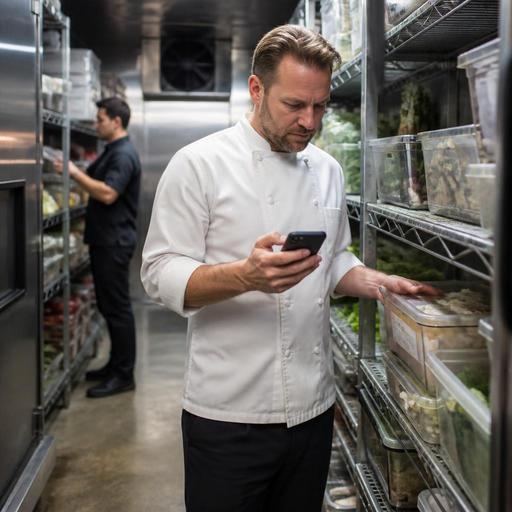
Cold Storage Alerts and Digital Inventory Habits for U.S. Restaurants
Cold storage alerts and digital inventory habits for U.S. restaurants can do more than prevent a walk-in disaster. They help operators protect food quality, reduce waste, tighten prep planning, and create calmer daily routines for managers, chefs, and shift leads. Whether you run a neighborhood diner, a fast-casual salad concept, a hotel breakfast kitchen, or a multi-location QSR brand, the real value comes from turning temperature warnings into repeatable action.
Why cold storage alerts matter beyond emergencies
Many operators think about refrigeration only when a cooler fails. In practice, the bigger problem is often smaller and more frequent: a reach-in door left ajar during lunch rush, a prep cook overloading pans so air cannot circulate, a food truck generator issue during service, or a delivery being placed in the wrong cooler. These moments may not create an obvious shutdown, but they can shorten shelf life, create inconsistency, and increase waste.
A digital alert system helps managers respond faster when a walk-in, undercounter unit, bar cooler, or freezer moves outside the target range. But the alert itself is only useful if the team knows what to do next. For example, a fast-casual burrito shop may need a simple escalation path: first alert goes to the shift lead, second alert goes to the kitchen manager, and if the issue continues, product is checked, moved, or held based on store policy. In a hotel restaurant, the overnight engineer or MOD may also need to be in that workflow.
Operators should verify current food safety requirements and recordkeeping expectations with local health department guidance and qualified advisors, because procedures can vary by state, county, and city. The operational goal is straightforward: know quickly when cold storage drifts, document what happened, and protect product before the next service period.
Build a response workflow your team can follow on a busy shift
The best cold storage process is not the most technical one. It is the one your team can actually use during a slammed Friday dinner or a Saturday brunch rush. A useful workflow should connect alerts, product checks, communication, and inventory decisions.
- Assign ownership by shift: Decide who responds first during breakfast, lunch, dinner, and overnight periods.
- Define the first check: Confirm whether the issue is a true temperature problem, a door issue, overstocking, power interruption, or sensor placement problem.
- Set product handling steps: Identify when staff should move dairy, proteins, sauces, desserts, or prepped produce to another unit.
- Log the event digitally: Record time, unit, action taken, and product impact so managers can spot patterns.
- Create an escalation rule: If the problem lasts beyond your internal threshold, notify senior management, facilities, or service vendors.
Consider a U.S. sports bar with wings, draft beer, and weekend volume spikes. If the bar cooler warms up, the impact may be different from a line cooler holding raw chicken and sauces. Your response plan should reflect the product risk and service role of each unit. A stadium concession stand may need an even tighter process because storage space is limited and replenishment windows are narrow. A food truck operator may need alerts tied to a mobile device because there is no back office manager watching a desktop dashboard.
Turn digital inventory into a daily operating habit
Cold storage alerts work best when paired with disciplined digital inventory habits. If your inventory records are outdated, an alert tells you a cooler has a problem but not what product is at risk, how much value may be affected, or what menu items could go out of stock before dinner.
Start with a simple rule: every product movement that matters operationally should become visible somewhere digital. That does not mean your team needs a complicated enterprise system on day one. It means receiving, transfers, prep conversions, waste, and count adjustments should not live only in someone’s memory or on a paper sheet taped near the walk-in.
For example, a suburban cafe with pastries, milk, yogurt, grab-and-go sandwiches, and bottled drinks can use a lightweight routine. Morning receiving gets logged, end-of-day milk counts are updated, and any spoilage tied to a cooler issue is entered before close. Over time, the owner sees which units create repeated loss and which menu items are most exposed to storage problems.
In a multi-location chicken concept, digital inventory habits can also improve purchasing. If one store repeatedly runs heavy par levels in a walk-in with frequent temperature swings, the issue may not just be equipment. It may be ordering discipline, shelf organization, or prep timing. Good visibility helps field operators coach the real behavior instead of blaming only the hardware.
Useful daily inventory habits for U.S. operators
- Count critical items at the same time each day, especially proteins, dairy, sauces, and high-cost prep.
- Separate waste reasons, such as spoilage, over-prep, expired packaged goods, or temperature event loss.
- Use unit-level notes, so managers can connect losses to the specific walk-in, freezer, bar cooler, or prep rail involved.
- Review par levels weekly, especially before holidays, game days, catering orders, or weather disruptions.
- Match inventory habits to your sales channels, including dine-in, direct online ordering, delivery apps, takeout, and curbside pickup.
Connect alerts to menu availability, prep, and guest experience
Inventory discipline is not just a back-of-house issue. It affects the guest-facing experience too. If a freezer alert causes product loss and nobody updates availability, your team may keep selling items you cannot fulfill. That creates refunds, substitutions, and frustrated guests at the pickup shelf or curbside handoff.
For a fast-casual bowl concept, a refrigeration issue with prepped proteins may require quick changes to online ordering menus, third-party delivery app menus, and in-store ordering screens. For a full-service restaurant, the host stand and servers need a fast update so they do not oversell specials. For a coffee shop, pastry availability may need to be adjusted before the morning rush builds. In each case, digital tools help operators move from reactive damage control to coordinated service recovery.
This is also where POS-connected workflows matter. If the POS, kitchen display system, online ordering flow, and inventory view are disconnected, managers spend valuable time calling staff, editing multiple systems, and explaining 86'd items repeatedly. A more connected setup makes it easier to update menu availability, protect the guest experience, and keep the line moving.
Operators with ADA-minded service goals should also think about how availability changes are communicated. If your restaurant relies on QR ordering or digital menus, make sure guests still have a clear and practical way to get accurate item availability through staff assistance or accessible alternatives. The operational principle is simple: technology should reduce confusion, not create another barrier.
What owners should review weekly and monthly
Cold storage management improves when owners and GMs review patterns instead of isolated incidents. A single alert may be random. Repeated alerts at the same time of day or in the same unit usually point to a process problem, maintenance issue, or staffing habit that needs attention.
- Weekly: review all temperature alerts, product loss entries, repeat door-open events, and any menu outages caused by storage issues.
- Weekly: compare waste logs with sales mix so you can see whether prep levels are too aggressive.
- Monthly: review service tickets, equipment downtime, and replacement risk for older units.
- Monthly: compare locations if you operate multiple stores, because one site may have better cooler organization or receiving discipline than another.
- Seasonally: prepare for summer heat, holiday traffic, local events, and delivery volume shifts that increase cooler door openings and storage pressure.
A diner near a highway exit may see extra summer takeout volume. An airport concession may face compressed peak periods and security-related delivery timing issues. A hotel restaurant may carry banquet prep that changes cold storage demand dramatically. These U.S. operating contexts are different, but the management habit is the same: use alerts and inventory records together to make better decisions before spoilage becomes a pattern.
When operators build consistent cold storage alerts, digital inventory routines, and menu update workflows, they reduce waste and protect service quality at the same time. Restomas supports restaurants that want clearer visibility across menus, orders, and operating workflows without adding unnecessary complexity.